Hi there 👋
Here’s a little story from something I’ve been building at work.
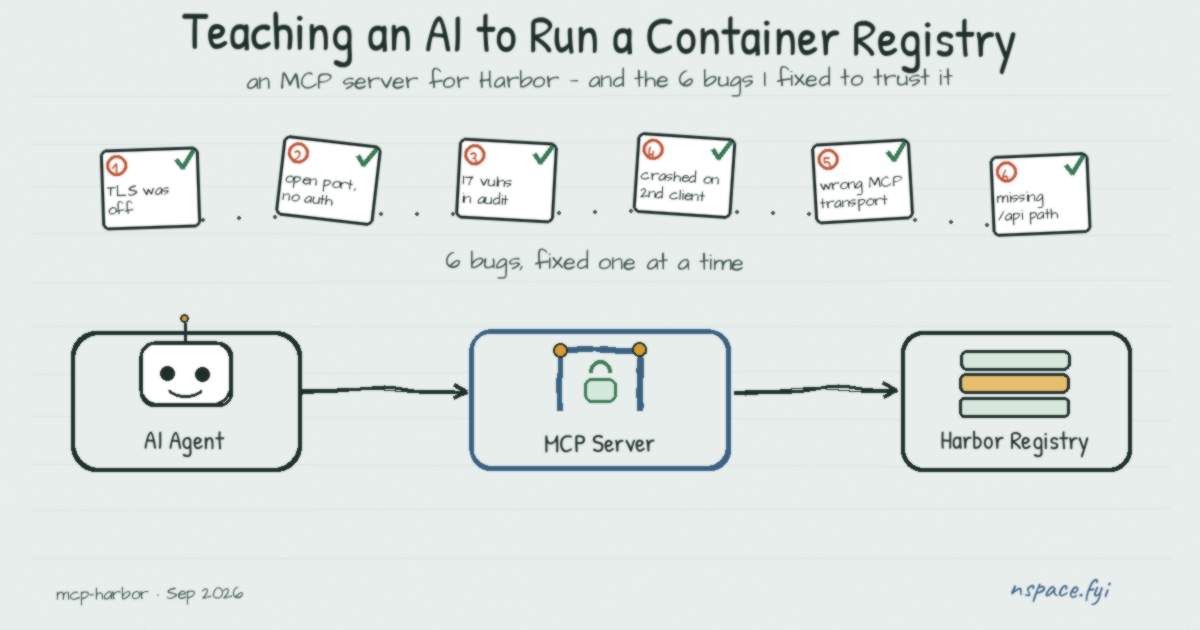
I wanted an AI agent to be able to manage a Harbor container registry directly — list projects, check repositories and tags, clean up old images — just by asking, instead of clicking through the Harbor UI every time. That’s exactly what the Model Context Protocol (MCP) is for: it lets an AI agent call real tools against real systems, safely.
Rather than build a Harbor MCP server from scratch, I searched around first — and it turned out someone had already open-sourced exactly that. I grabbed the original source, saved my own copy of it, and started going through it before actually relying on it. What began as “just a quick security review” turned into updating and modifying it piece by piece, chasing down a string of bugs one at a time before it actually worked end-to-end.
🔍 Problem #1: TLS verification was switched off, always
The very first thing I noticed was a single line that disabled TLS certificate verification for the entire Node process, unconditionally, on startup. That’s a real man-in-the-middle risk — anyone on the network path to Harbor could intercept credentials. I made it opt-in behind an explicit flag instead, so it only turns off when someone genuinely needs it for a self-signed internal certificate.
🔍 Problem #2: the remote transport had no lock on the door
This MCP server can run in two modes: stdio (spawned directly by the AI client, no network exposure at all) or an HTTP/SSE mode for remote access. The SSE mode was binding to 0.0.0.0 — every network interface — with zero authentication. Anyone who could reach the port could call any tool, including destructive ones like deleting a project. I made the bind address configurable (defaulting to localhost) and added bearer-token authentication in front of it.
🔍 Problem #3: 17 vulnerabilities in npm audit
Some were low-stakes dev-tooling noise, but two were real: the MCP SDK itself didn’t enable DNS-rebinding protection by default on its HTTP transport, and there was an entirely unused axios dependency sitting in package.json — never imported anywhere in the code — quietly responsible for about 30 of those advisories, including a critical one. Deleted the dead dependency, upgraded the SDK (which, amusingly, forced a TypeScript major-version bump too, since the SDK’s newer validation library only parses under TypeScript 5+). Ended at 0 vulnerabilities.
🔍 Problem #4: it crashed the moment a second client connected
This one only showed up under real testing. The server used a single shared MCP protocol instance across every incoming connection — but the SDK only allows one transport per instance. The second client to connect threw an unhandled error that took the entire process down, not just that one request. Every connection now gets its own instance, and errors are caught per-request instead of nuking the server.
🔍 Problem #5: connected… then an instant 404
Even after fixing the crash, the AI agent platform I was testing with still couldn’t talk to it — logs showed the connection succeeding, then an immediate 404. Turned out the client spoke the current MCP transport spec (Streamable HTTP, a single endpoint), while the server only implemented the deprecated SSE transport (two endpoints, an older handshake). I added a proper Streamable HTTP endpoint alongside the legacy one, following the SDK’s own backwards-compatible reference pattern, so both old and new clients work against the same server.
🔍 Problem #6: connected, talking… and returning garbage
Last one: every tool call either threw X.map is not a function or silently returned an empty {} for a project that definitely existed. The Harbor client library expects the configured URL to point at Harbor’s actual REST API path (/api/v2.0), not just the bare host — hit it without that suffix and you silently get Harbor’s web UI instead of its JSON API. I made the server auto-append /api/v2.0 when it’s missing, so this can’t quietly bite the next person who sets it up.
🎯 Where it landed
An AI agent can now safely list, create, and clean up Harbor projects/repositories/tags/charts through plain-language requests — over a transport that’s authenticated, doesn’t fall over under concurrent use, speaks both old and new MCP clients, and has a clean dependency tree.
🛠️ Try it yourself
git clone https://github.com/nurawiguna/mcp-harbor
cd mcp-harbor
npm install
npm run build
Configure it via .env (see .env.example in the repo), then run it either as a local stdio server for your AI client, or as a network-reachable service:
npm start -- --sse --sse-auth-token "$(openssl rand -hex 32)"Point your MCP client at http://<host>:3000/mcp, and you’re in.
Full write-up of the config options, security notes, and troubleshooting is in the repo’s README.